Tencent COS
Sync Vault supports synchronization via Tencent Cloud Object Storage (COS). Tencent Cloud COS offers stable service and fast speeds, making it suitable for most users.
IMPORTANTNote: Before use, please confirm the object storage capacity.
Purchasing Tencent Cloud COS Object Storage
Section titled “Purchasing Tencent Cloud COS Object Storage”Go to the Tencent Cloud official website and select the corresponding object storage plan.
Configuring Sync Vault
Section titled “Configuring Sync Vault”
As shown in the figure, click 【Get Started】-【S3】-【Authorize】, then enter the corresponding parameters in the pop-up window:
- Endpoint: No need to fill in.
- Region: Go to the Bucket List, check the “Region” column, and copy the English name here.
- Access Key ID: Go to API Permission Control to obtain the SecretID.
- Secret Access Key: Go to API Permission Control to obtain the SecretKey.
After completion, click the “Test Connection” button to verify if the configuration is correct.
Configuring CORS
Section titled “Configuring CORS”If you encounter the error Failed to set CORS configuration. Please configure it manually, go to the Bucket List to configure CORS, referring to the figure below: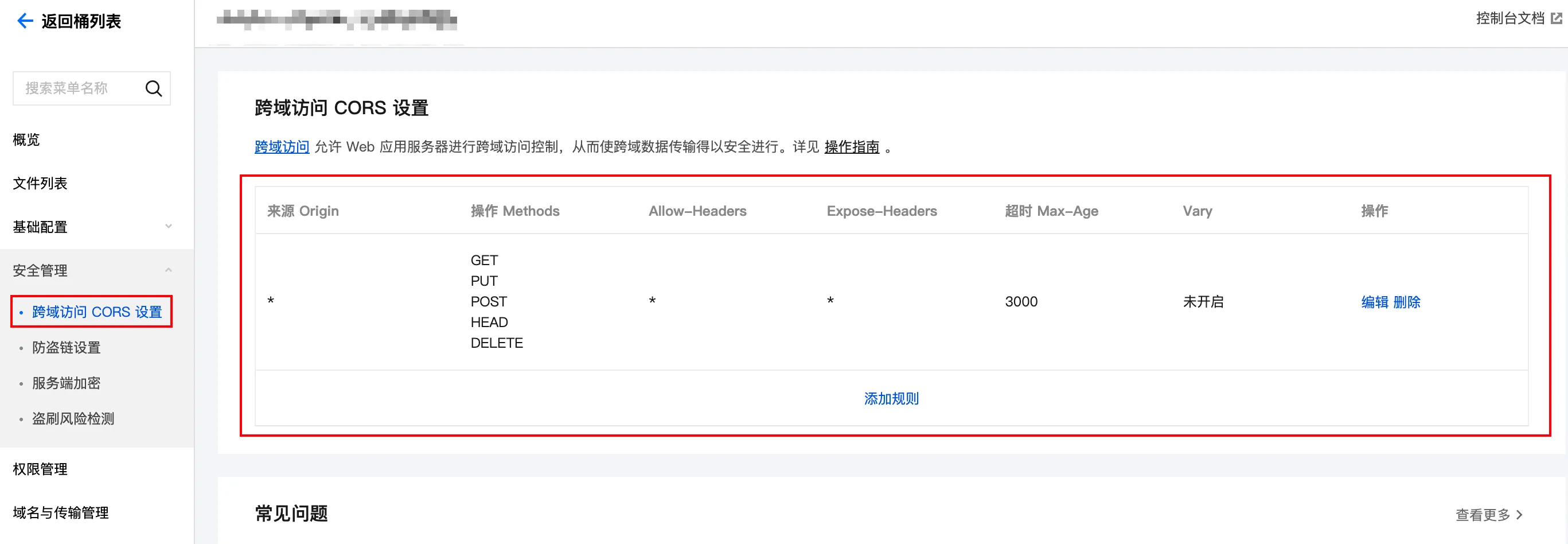
After this, you can start multi-device synchronization via Tencent Cloud COS.